Senin, 10 Desember 2018

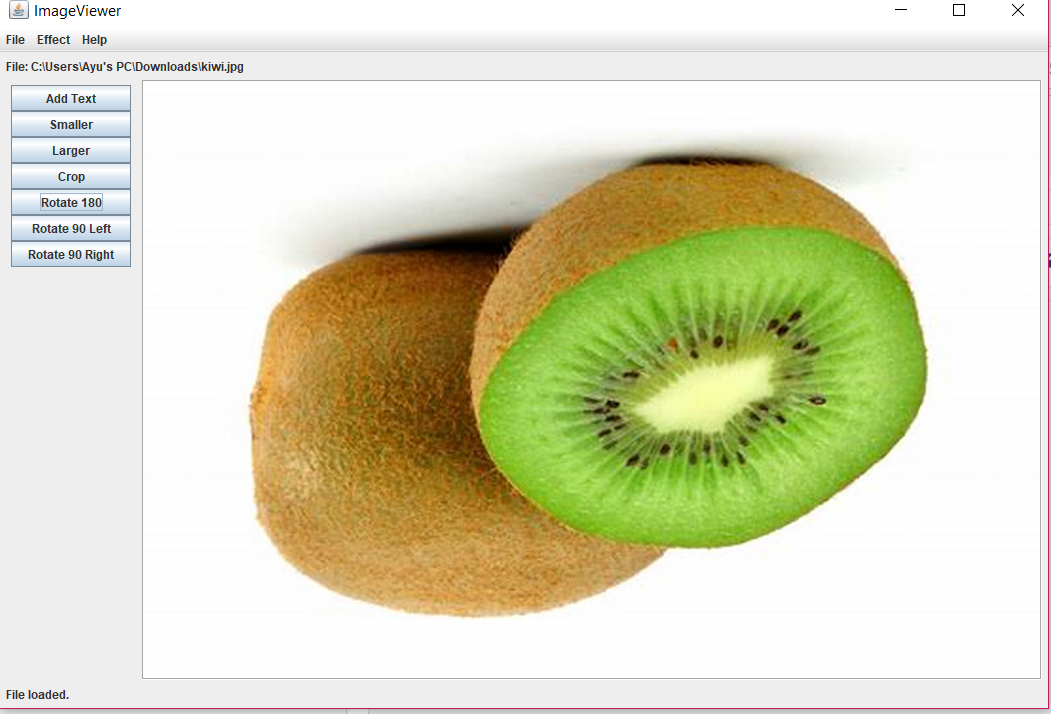
EAS PBO A- Image Editor

Nama: Ayu Mutiara Sari
NRP: 05111740000149
Kelas: PBOA

1. Interfaces:
2. Terdapat 11 class:
Image Panel                  : komponen swing yang dapat menampilkan OFImage
Image Viewer               : main class dari program imageviewer, mengatur keseluruhan class
OFImage                      : mendefinisikan sebuah gambar dalam format OF
Image File Manager     : class untuk membuka dan menyimpan gambar
Fish Eye Filter             : memberikan efek "fish eye" pada gambar
Darker Filter                : memberikan efek gelap pada gambar
Edge Filter                   : memberikan efek edge pada gambar
Invert Filter                  : memberikan efek invert pada gambar
Mirror Filter                 : memberikan efek mirror pada gambar
Gray Scale Filter          : memberikan efek hitam dan putih pada gambar
Filter                             : class utama untuk filter

3. Hasil:

- Image Panel

 /**  
  * Write a description of class ImagePanel here.  
  *  
  * @author Ayu Mutiara Sari  
  * @version 01.01  
  */  
 import java.awt.*;  
 import javax.swing.*;  
 import java.awt.image.*;  
 public class ImagePanel extends JComponent   
  {   
   // The current width and height of this panel   
   private int width, height;   
   // An internal image buffer that is used for painting. For   
   // actual display, this image buffer is then copied to screen.   
   private OFImage panelImage;   
   /**   
   * Create a new, empty ImagePanel.   
   */   
   public ImagePanel()   
   {   
    width = 360; // arbitrary size for empty panel   
    height = 240;   
    panelImage = null;   
   }   
   /**   
   * Set the image that this panel should show.   
   *    
   * @param image The image to be displayed.   
   */   
   public void setImage(OFImage image)   
   {   
    if(image != null) {   
     width = image.getWidth();   
     height = image.getHeight();   
     panelImage = image;   
     repaint();   
    }   
   }   
   /**   
   * Clear the image on this panel.   
   */   
   public void clearImage()   
   {   
    Graphics imageGraphics = panelImage.getGraphics();   
    imageGraphics.setColor(Color.LIGHT_GRAY);   
    imageGraphics.fillRect(0, 0, width, height);   
    repaint();   
   }   
   // The following methods are redefinitions of methods   
   // inherited from superclasses.   
   /**   
   * Tell the layout manager how big we would like to be.   
   * (This method gets called by layout managers for placing   
   * the components.)   
   *    
   * @return The preferred dimension for this component.   
   */   
   public Dimension getPreferredSize()   
   {   
    return new Dimension(width, height);   
   }   
   /**   
   * This component needs to be redisplayed. Copy the internal image    
   * to screen. (This method gets called by the Swing screen painter    
   * every time it want this component displayed.)   
   *    
   * @param g The graphics context that can be used to draw on this component.   
   */   
   public void paintComponent(Graphics g)   
   {   
    Dimension size = getSize();   
    g.clearRect(0, 0, size.width, size.height);   
    if(panelImage != null) {   
     g.drawImage(panelImage, 0, 0, null);   
    }   
   }   
  }   


- Image Viewer

  import java.awt.*;   
  import java.awt.event.*;   
  import java.awt.image.*;   
  import javax.swing.*;   
  import javax.swing.border.*;   
  import java.io.File;   
  import java.util.List;   
  import java.util.ArrayList;   
  import java.util.Iterator;   
  import java.awt.Graphics;   
  import java.awt.Image;   
  import java.awt.image.BufferedImage;   
  /**   
  * ImageViewer is the main class of the image viewer application. It builds and   
  * displays the application GUI and initialises all other components.   
  *    
  * To start the application, create an object of this class.   
  *    
  * @author Ayu Mutiara Sari   
  * @version 01.01   
  */   
  public class ImageViewer   
  {   
   private static final String VERSION = "Version 3.1";   
   private static JFileChooser fileChooser = new JFileChooser(System.getProperty("user.dir"));   
   private JFrame frame;   
   private ImagePanel imagePanel;   
   private JLabel filenameLabel;   
   private JLabel statusLabel;   
   private JButton smallerButton;   
   private JButton textButton;   
   private JButton largerButton;   
   private JButton cropButton;   
   private JButton rotButton;   
   private JButton rotaButton;   
   private JButton rotateButton;   
   private OFImage currentImage;    
   private List<Filter> filters;   
   public ImageViewer()   
   {   
    currentImage = null;   
    filters = createFilters();   
    makeFrame();   
   }   
   private void makeText()   
   {   
    if(currentImage != null) {   
     int width = currentImage.getWidth();   
     int height = currentImage.getHeight();   
     int xPosition = Integer.parseInt(JOptionPane.showInputDialog("Posisi X"));   
     int yPosition = Integer.parseInt(JOptionPane.showInputDialog("Posisi Y"));   
     float fontSize = Float.parseFloat(JOptionPane.showInputDialog("Besar Font"));   
     String addText = JOptionPane.showInputDialog("Ketik sesuatu..");   
     OFImage newImage = new OFImage(width, height);   
     // copy pixel data into new image   
     for(int y = 0; y < height; y++) {   
      for(int x = 0; x < width; x++) {   
       Color col = currentImage.getPixel(x, y);   
       newImage.setPixel(x, y, col);   
      }   
     }   
     Graphics g = newImage.getGraphics();   
     g.setFont(g.getFont().deriveFont(fontSize));   
     g.drawString(addText, xPosition, yPosition);   
     g.dispose();   
     currentImage = newImage;   
     imagePanel.setImage(currentImage);   
    }   
   }   
   private void openFile()   
   {   
    int returnVal = fileChooser.showOpenDialog(frame);   
    if(returnVal != JFileChooser.APPROVE_OPTION) {   
     return;    
    }   
    File selectedFile = fileChooser.getSelectedFile();   
    currentImage = ImageFileManager.loadImage(selectedFile);   
    if(currentImage == null) {    
     JOptionPane.showMessageDialog(frame,   
       "The file was not in a recognized image file format.",   
       "Image Load Error",   
       JOptionPane.ERROR_MESSAGE);   
     return;   
    }   
    imagePanel.setImage(currentImage);   
    setButtonsEnabled(true);   
    showFilename(selectedFile.getPath());   
    showStatus("File loaded.");   
    frame.pack();   
   }   
   private void close()   
   {   
    currentImage = null;   
    imagePanel.clearImage();   
    showFilename(null);   
    setButtonsEnabled(false);   
   }   
   private void saveAs()   
   {   
    if(currentImage != null) {   
     int returnVal = fileChooser.showSaveDialog(frame);   
     if(returnVal != JFileChooser.APPROVE_OPTION) {   
      return;    
     }   
     File selectedFile = fileChooser.getSelectedFile();   
     ImageFileManager.saveImage(currentImage, selectedFile);   
     showFilename(selectedFile.getPath());   
    }   
   }   
   private void quit()   
   {   
    System.exit(0);   
   }   
   private void applyFilter(Filter filter)   
   {   
    if(currentImage != null) {   
     filter.apply(currentImage);   
     frame.repaint();   
     showStatus("Applied: " + filter.getName());   
    }   
    else {   
     showStatus("No image loaded.");   
    }   
   }   
   private void showAbout()   
   {   
    JOptionPane.showMessageDialog(frame,    
       "ImageViewer\n" + VERSION,   
       "About ImageViewer",    
       JOptionPane.INFORMATION_MESSAGE);   
   }   
   private void makeLarger()   
   {   
    if(currentImage != null) {   
     int width = currentImage.getWidth();   
     int height = currentImage.getHeight();   
     OFImage newImage = new OFImage(width * 2, height * 2);   
     for(int y = 0; y < height; y++) {   
      for(int x = 0; x < width; x++) {   
       Color col = currentImage.getPixel(x, y);   
       newImage.setPixel(x * 2, y * 2, col);   
       newImage.setPixel(x * 2 + 1, y * 2, col);   
       newImage.setPixel(x * 2, y * 2 + 1, col);   
       newImage.setPixel(x * 2+1, y * 2 + 1, col);   
      }   
     }   
     currentImage = newImage;   
     imagePanel.setImage(currentImage);   
     frame.pack();   
    }   
   }   
   private void makeSmaller()   
   {   
    if(currentImage != null) {   
     int width = currentImage.getWidth() / 2;   
     int height = currentImage.getHeight() / 2;   
     OFImage newImage = new OFImage(width, height);   
     for(int y = 0; y < height; y++) {   
      for(int x = 0; x < width; x++) {   
       newImage.setPixel(x, y, currentImage.getPixel(x * 2, y * 2));   
      }   
     }   
     currentImage = newImage;   
     imagePanel.setImage(currentImage);   
     frame.pack();   
    }   
   }   
   private void crop()   
   {   
    if (currentImage != null)   
    {   
     int width = currentImage.getWidth();   
     int height = currentImage.getWidth();   
     int xAwal = Integer.parseInt(JOptionPane.showInputDialog("x.akhir"));   
     int yAwal = Integer.parseInt(JOptionPane.showInputDialog("y.akhir"));   
     int xAkhir = Integer.parseInt(JOptionPane.showInputDialog("x.awal"));   
     int yAkhir = Integer.parseInt(JOptionPane.showInputDialog("y.awal"));   
     OFImage newImage = new OFImage(xAkhir - xAwal, yAkhir - yAwal);   
     for (int y = 0; y < yAkhir - yAwal; y++)   
     {   
      for (int x = 0; x < xAkhir - xAwal; x++)   
      {   
       newImage.setPixel(x, y, currentImage.getPixel(x + xAwal, y + yAwal));   
      }   
     }   
     currentImage = newImage;   
     imagePanel.setImage(currentImage);   
     frame.pack();   
    }   
   }   
   private void showFilename(String filename)   
   {   
    if(filename == null) {   
     filenameLabel.setText("No file displayed.");   
    }   
    else {   
     filenameLabel.setText("File: " + filename);   
    }   
   }   
   private void showStatus(String text)   
   {   
    statusLabel.setText(text);   
   }   
   private void setButtonsEnabled(boolean status)   
   {   
    smallerButton.setEnabled(status);   
    largerButton.setEnabled(status);   
    cropButton.setEnabled(status);   
    rotButton.setEnabled(status);   
    rotaButton.setEnabled(status);   
    rotateButton.setEnabled(status);   
   }   
   private List<Filter> createFilters()   
   {   
    List<Filter> filterList = new ArrayList<Filter>();   
    filterList.add(new DarkerFilter("Darker"));    
    filterList.add(new InvertFilter("Invert"));   
    filterList.add(new MirrorFilter("Mirror"));   
    filterList.add(new GrayScaleFilter("Grayscale"));   
    filterList.add(new EdgeFilter("Edge Detection"));   
    filterList.add(new FishEyeFilter("Fish Eye"));   
    return filterList;   
   }   
   private void makeFrame()   
   {   
    frame = new JFrame("ImageViewer");   
    JPanel contentPane = (JPanel)frame.getContentPane();   
    contentPane.setBorder(new EmptyBorder(6, 6, 6, 6));   
    makeMenuBar(frame);   
    contentPane.setLayout(new BorderLayout(6, 6));   
    imagePanel = new ImagePanel();   
    imagePanel.setBorder(new EtchedBorder());   
    contentPane.add(imagePanel, BorderLayout.CENTER);   
    filenameLabel = new JLabel();   
    contentPane.add(filenameLabel, BorderLayout.NORTH);   
    statusLabel = new JLabel(VERSION);   
    contentPane.add(statusLabel, BorderLayout.SOUTH);   
    JPanel toolbar = new JPanel();   
    toolbar.setLayout(new GridLayout(0, 1));   
    textButton = new JButton("Add Text");   
    textButton.addActionListener(new ActionListener() {   
          public void actionPerformed(ActionEvent e) { makeText();}   
         });   
    toolbar.add(textButton);   
    smallerButton = new JButton("Smaller");   
    smallerButton.addActionListener(new ActionListener() {   
          public void actionPerformed(ActionEvent e) { makeSmaller(); }   
         });   
    toolbar.add(smallerButton);   
    largerButton = new JButton("Larger");   
    largerButton.addActionListener(new ActionListener() {   
          public void actionPerformed(ActionEvent e) { makeLarger(); }   
         });   
    toolbar.add(largerButton);   
    cropButton = new JButton("Crop");   
    cropButton.addActionListener(new ActionListener() {   
          public void actionPerformed(ActionEvent e) { crop(); }   
         });   
    toolbar.add(cropButton);   
    rotateButton = new JButton("Rotate 180");   
    rotateButton.addActionListener(new ActionListener() {   
          public void actionPerformed(ActionEvent e) { Rotate180(); }   
         });   
    toolbar.add(rotateButton);   
    rotButton = new JButton("Rotate 90 Left");   
    rotButton.addActionListener(new ActionListener() {   
          public void actionPerformed(ActionEvent e) { Rotate90left(); }   
         });   
    toolbar.add(rotButton);   
    rotaButton = new JButton("Rotate 90 Right");   
    rotaButton.addActionListener(new ActionListener() {   
          public void actionPerformed(ActionEvent e) { Rotate90right(); }   
         });   
    toolbar.add(rotaButton);   
    JPanel flow = new JPanel();   
    flow.add(toolbar);   
    contentPane.add(flow, BorderLayout.WEST);    
    showFilename(null);   
    setButtonsEnabled(false);   
    frame.pack();     
    Dimension d = Toolkit.getDefaultToolkit().getScreenSize();   
    frame.setLocation(d.width/2 - frame.getWidth()/2, d.height/2 - frame.getHeight()/2);   
    frame.setVisible(true);   
   }   
   private void Rotate180() {   
    if(currentImage != null) {   
     // create new image with double size   
     int width = currentImage.getWidth();   
     int height = currentImage.getHeight();   
     OFImage newImage = new OFImage(width, height);   
     //copy pixel data into new image   
     for(int y = 0; y < height; y++) {   
      for(int x = 0; x < width; x++) {   
       Color col = currentImage.getPixel(width-x-1, height-y-1);   
       newImage.setPixel(x, y, col);   
      }   
     }   
     currentImage = newImage;   
     imagePanel.setImage(currentImage);   
     frame.pack();   
    }   
   }   
   private void Rotate90left() {   
    if(currentImage != null) {   
     // create new image with double size   
     int width = currentImage.getWidth();   
     int height = currentImage.getHeight();   
     OFImage newImage = new OFImage(height, width);   
     //copy pixel data into new image   
     for(int y = 0; y < height; y++) {   
      for(int x = 0; x < width; x++) {   
       Color col = currentImage.getPixel(x, y);   
       newImage.setPixel(y, width-x-1, col);   
      }   
     }   
     currentImage = newImage;   
     imagePanel.setImage(currentImage);   
     frame.pack();   
    }   
   }   
   private void Rotate90right() {   
    if(currentImage != null) {   
     // create new image with double size   
     int width = currentImage.getWidth();   
     int height = currentImage.getHeight();   
     OFImage newImage = new OFImage(height, width);   
     //copy pixel data into new image   
     for(int y = 0; y < height; y++) {   
      for(int x = 0; x < width; x++) {   
       Color col = currentImage.getPixel(x, y);   
       newImage.setPixel(height-y-1, x, col);   
      }   
     }   
     currentImage = newImage;   
     imagePanel.setImage(currentImage);   
     frame.pack();   
    }   
   }   
   private void makeMenuBar(JFrame frame)   
   {   
    final int SHORTCUT_MASK =   
     Toolkit.getDefaultToolkit().getMenuShortcutKeyMask();   
    JMenuBar menubar = new JMenuBar();   
    frame.setJMenuBar(menubar);   
    JMenu menu;   
    JMenuItem item;   
    // create the File menu   
    menu = new JMenu("File");   
    menubar.add(menu);   
    item = new JMenuItem("Open...");   
     item.setAccelerator(KeyStroke.getKeyStroke(KeyEvent.VK_O, SHORTCUT_MASK));   
     item.addActionListener(new ActionListener() {   
          public void actionPerformed(ActionEvent e) { openFile(); }   
         });   
    menu.add(item);   
    item = new JMenuItem("Close");   
     item.setAccelerator(KeyStroke.getKeyStroke(KeyEvent.VK_W, SHORTCUT_MASK));   
     item.addActionListener(new ActionListener() {   
          public void actionPerformed(ActionEvent e) { close(); }   
         });   
    menu.add(item);   
    menu.addSeparator();   
    item = new JMenuItem("Save As...");   
     item.setAccelerator(KeyStroke.getKeyStroke(KeyEvent.VK_S, SHORTCUT_MASK));   
     item.addActionListener(new ActionListener() {   
          public void actionPerformed(ActionEvent e) { saveAs(); }   
         });   
    menu.add(item);   
    menu.addSeparator();   
    item = new JMenuItem("Quit");   
     item.setAccelerator(KeyStroke.getKeyStroke(KeyEvent.VK_Q, SHORTCUT_MASK));   
     item.addActionListener(new ActionListener() {   
          public void actionPerformed(ActionEvent e) { quit(); }   
         });   
    menu.add(item);   
    // create the Filter menu   
    menu = new JMenu("Effect");   
    menubar.add(menu);   
    for(final Filter filter : filters) {   
     item = new JMenuItem(filter.getName());   
     item.addActionListener(new ActionListener() {   
          public void actionPerformed(ActionEvent e) {    
           applyFilter(filter);   
          }   
         });   
     menu.add(item);   
    }   
    // create the Help menu   
    menu = new JMenu("Help");   
    menubar.add(menu);   
    item = new JMenuItem("About ImageViewer...");   
     item.addActionListener(new ActionListener() {   
          public void actionPerformed(ActionEvent e) { showAbout(); }   
         });   
    menu.add(item);   
   }   
  }   

- OFImage

 /**  
  * Write a description of class OFImage here.  
  *  
  * @author Ayu Mutiara Sari  
  * @version 01.01  
  */  
 import java.awt.*;  
 import java.awt.image.*;  
 import javax.swing.*;  
 public class OFImage extends BufferedImage   
  {   
   /**   
   * Create an OFImage copied from a BufferedImage.   
   * @param image The image to copy.   
   */   
   public OFImage(BufferedImage image)   
   {   
    super(image.getColorModel(), image.copyData(null),    
      image.isAlphaPremultiplied(), null);   
   }   
   /**   
   * Create an OFImage with specified size and unspecified content.   
   * @param width The width of the image.   
   * @param height The height of the image.   
   */   
   public OFImage(int width, int height)   
   {   
    super(width, height, TYPE_INT_RGB);   
   }   
   /**   
   * Set a given pixel of this image to a specified color. The   
   * color is represented as an (r,g,b) value.   
   * @param x The x position of the pixel.   
   * @param y The y position of the pixel.   
   * @param col The color of the pixel.   
   */   
   public void setPixel(int x, int y, Color col)   
   {   
    int pixel = col.getRGB();   
    setRGB(x, y, pixel);   
   }   
   /**   
   * Get the color value at a specified pixel position.   
   * @param x The x position of the pixel.   
   * @param y The y position of the pixel.   
   * @return The color of the pixel at the given position.   
   */   
   public Color getPixel(int x, int y)   
   {   
    int pixel = getRGB(x, y);   
    return new Color(pixel);   
   }   
   /**   
   * Make this image a bit darker.   
   */   
   public void darker()   
   {   
    int height = getHeight();   
    int width = getWidth();   
    for(int y = 0; y < height; y++) {   
     for(int x = 0; x < width; x++) {   
      setPixel(x, y, getPixel(x, y).darker());   
     }   
    }   
   }   
   /**   
   * Make this image a bit lighter.   
   */   
   public void lighter()   
   {   
    int height = getHeight();   
    int width = getWidth();   
    for(int y = 0; y < height; y++) {   
     for(int x = 0; x < width; x++) {   
      setPixel(x, y, getPixel(x, y).brighter());   
     }   
    }   
   }   
   /**   
   * Perform a three level threshold operation.   
   * That is: repaint the image with only three color values:   
   *   white, gray, and black.   
   */   
   public void threshold()   
   {   
    int height = getHeight();   
    int width = getWidth();   
    for(int y = 0; y < height; y++) {   
     for(int x = 0; x < width; x++) {   
      Color pixel = getPixel(x, y);   
      int brightness = (pixel.getRed() + pixel.getBlue() + pixel.getGreen()) / 3;   
      if(brightness <= 85) {   
       setPixel(x, y, Color.BLACK);   
      }   
      else if(brightness <= 170) {   
       setPixel(x, y, Color.GRAY);   
      }   
      else {   
       setPixel(x, y, Color.WHITE);   
      }   
     }   
    }   
   }   
  }   

- ImageFileManager

 /**  
  * Write a description of class imageFileManager here.  
  *  
  * @author Ayu Mutiara Sari  
  * @version 01.01  
  */  
 import java.awt.image.*;  
 import javax.imageio.*;  
 import java.io.*;  
 public class ImageFileManager   
  {   
   // A constant for the image format that this writer uses for writing.   
   // Available formats are "jpg" and "png".   
   private static final String IMAGE_FORMAT = "jpg";   
   /**   
   * Read an image file from disk and return it as an image. This method   
   * can read JPG and PNG file formats. In case of any problem (e.g the file    
   * does not exist, is in an undecodable format, or any other read error)    
   * this method returns null.   
   *    
   * @param imageFile The image file to be loaded.   
   * @return   The image object or null is it could not be read.   
   */   
   public static OFImage loadImage(File imageFile)   
   {   
    try {   
     BufferedImage image = ImageIO.read(imageFile);   
     if(image == null || (image.getWidth(null) < 0)) {   
      // we could not load the image - probably invalid file format   
      return null;   
     }   
     return new OFImage(image);   
    }   
    catch(IOException exc) {   
     return null;   
    }   
   }   
   /**   
   * Write an image file to disk. The file format is JPG. In case of any    
   * problem the method just silently returns.   
   *    
   * @param image The image to be saved.   
   * @param file The file to save to.   
   */   
   public static void saveImage(OFImage image, File file)   
   {   
    try {   
     ImageIO.write(image, IMAGE_FORMAT, file);   
    }   
    catch(IOException exc) {   
     return;   
    }   
   }   
  }   

- Fish Eye Filter

 /**  
  * Write a description of class FishEyeFilter here.  
  *  
  * @author Ayu Mutiara Sari  
  * @version 01.01  
  */  
 import java.awt.Color;  
 public class FishEyeFilter extends Filter  
 {  
   // constants:  
   private final static int SCALE = 20;  // this defines the strenght of the filter  
   private final static double TWO_PI = 2 * Math.PI;  
   /**  
    * Constructor for objects of class LensFilter.  
    * @param name The name of the filter.  
    */  
   public FishEyeFilter(String name)  
   {  
     super(name);  
   }  
   /**  
    * Apply this filter to an image.  
    *   
    * @param image The image to be changed by this filter.  
    */  
   public void apply(OFImage image)  
   {  
     int height = image.getHeight();  
     int width = image.getWidth();  
     OFImage original = new OFImage(image);  
     int[] xa = computeXArray(width);  
     int[] ya = computeYArray(height);  
     for(int y = 0; y < height; y++) {  
       for(int x = 0; x < width; x++) {  
         image.setPixel(x, y, original.getPixel(x + xa[x], y + ya[y]));  
       }  
     }  
   }  
   /**  
    * Compute and return an array of horizontal offsets for each pixel column.  
    * These can then be applied as the horizontal offset for each pixel.  
    */  
   private int[] computeXArray(int width)  
   {  
     int[] xArray = new int[width];  
     for(int i=0; i < width; i++) {  
       xArray[i] = (int)(Math.sin( ((double)i / width) * TWO_PI) * SCALE);  
     }  
     return xArray;  
   }  
   /**  
    * Compute and return an array of vertical offsets for each pixel row.  
    * These can then be applied as the vertical offset for each pixel.  
    */  
   private int[] computeYArray(int height)  
   {  
     int[] yArray = new int[height];  
     for(int i=0; i < height; i++) {  
       yArray[i] = (int)(Math.sin( ((double)i / height) * TWO_PI) * SCALE);  
     }  
     return yArray;  
   }  
 }  

- Darker Filter

 /**  
  * Write a description of class DarkerFilter here.  
  *  
  * @author Ayu Mutiara Sari  
  * @version 01.01  
  */  
 public class DarkerFilter extends Filter  
 {  
   /**  
    * Constructor for objects of class DarkerFilter.  
    * @param name The name of the filter.  
    */  
   public DarkerFilter(String name)  
   {  
     super(name);  
   }  
   /**  
    * Apply this filter to an image.  
    *   
    * @param image The image to be changed by this filter.  
    */  
   public void apply(OFImage image)  
   {  
     int height = image.getHeight();  
     int width = image.getWidth();  
     for(int y = 0; y < height; y++) {  
       for(int x = 0; x < width; x++) {  
         image.setPixel(x, y, image.getPixel(x, y).darker());  
       }  
     }  
   }  
 }  

- Edge Filter

 /**  
  * Write a description of class EdgeFilter here.  
  *  
  * @author Ayu Mutiara Sari  
  * @version 01.01  
  */  
 import java.awt.Color;  
 import java.util.List;  
 import java.util.ArrayList;  
 public class EdgeFilter extends Filter  
 {  
   private static final int TOLERANCE = 20;  
   private OFImage original;  
   private int width;  
   private int height;  
   /**  
    * Constructor for objects of class EdgeFilter.  
    * @param name The name of the filter.  
    */  
   public EdgeFilter(String name)  
   {  
     super(name);  
   }  
   /**  
    * Apply this filter to an image.  
    *   
    * @param image The image to be changed by this filter.  
    */  
   public void apply(OFImage image)  
   {  
     original = new OFImage(image);  
     width = original.getWidth();  
     height = original.getHeight();  
     for(int y = 0; y < height; y++) {  
       for(int x = 0; x < width; x++) {  
         image.setPixel(x, y, edge(x, y));  
       }  
     }  
   }  
   /**  
    * Return a new color that is the smoothed color of a given  
    * position. The "smoothed color" is the color value that is the  
    * average of this pixel and all the adjacent pixels.  
    * @param xpos The x position of the pixel.  
    * @param ypos The y position of the pixel.  
    * @return The smoothed color.  
    */  
   private Color edge(int xpos, int ypos)  
   {  
     List<Color> pixels = new ArrayList<Color>(9);  
     for(int y = ypos-1; y <= ypos+1; y++) {  
       for(int x = xpos-1; x <= xpos+1; x++) {  
         if( x >= 0 && x < width && y >= 0 && y < height ) {  
           pixels.add(original.getPixel(x, y));  
         }  
       }  
     }  
     return new Color(255 - diffRed(pixels), 255 - diffGreen(pixels), 255 - diffBlue(pixels));  
   }  
   /**  
    * @param pixels The list of pixels to be averaged.  
    * @return The average of all the red values in the given list of pixels.  
    */  
   private int diffRed(List<Color> pixels)  
   {  
     int max = 0;  
     int min = 255;  
     for(Color color : pixels) {  
       int val = color.getRed();  
       if(val > max) {  
         max = val;  
       }  
       if(val < min) {  
         min = val;  
       }  
     }  
     int difference = max - min - TOLERANCE;  
     if(difference < 0) {  
       difference = 0;  
     }  
     return difference;  
   }  
   /**  
    * @param pixels The list of pixels to be averaged.  
    * @return The average of all the green values in the given list of pixels.  
    */  
   private int diffGreen(List<Color> pixels)  
   {  
     int max = 0;  
     int min = 255;  
     for(Color color : pixels) {  
       int val = color.getGreen();  
       if(val > max) {  
         max = val;  
       }  
       if(val < min) {  
         min = val;  
       }  
     }  
     int difference = max - min - TOLERANCE;  
     if(difference < 0) {  
       difference = 0;  
     }  
     return difference;  
   }  
   /**  
    * @param pixels The list of pixels to be averaged.  
    * @return The average of all the blue values in the given list of pixels.  
    */  
   private int diffBlue(List<Color> pixels)  
   {  
     int max = 0;  
     int min = 255;  
     for(Color color : pixels) {  
       int val = color.getBlue();  
       if(val > max) {  
         max = val;  
       }  
       if(val < min) {  
         min = val;  
       }  
     }  
     int difference = max - min - TOLERANCE;  
     if(difference < 0) {  
       difference = 0;  
     }  
     return difference;  
   }  
 }  

- Invert Filter

 /**  
  * Write a description of class InvertFilter here.  
  *  
  * @author Ayu Mutiara Sari  
  * @version 01.01  
  */  
 import java.awt.Color;  
 public class InvertFilter extends Filter  
 {  
   /**  
    * Constructor for objects of class InvertFilter.  
    * @param name The name of the filter.  
    */  
   public InvertFilter(String name)  
   {  
     super(name);  
   }  
   /**  
    * Apply this filter to an image.  
    *   
    * @param image The image to be changed by this filter.  
    */  
   public void apply(OFImage image)  
   {  
     int height = image.getHeight();  
     int width = image.getWidth();  
     for(int y = 0; y < height; y++) {  
       for(int x = 0; x < width; x++) {  
         Color pix = image.getPixel(x, y);  
         image.setPixel(x, y, new Color(255 - pix.getRed(),  
                         255 - pix.getGreen(),  
                         255 - pix.getBlue()));  
       }  
     }  
   }  
 }  

- Mirror Filter

 /**  
  * Write a description of class MirrorFilter here.  
  *  
  * @author Ayu Mutiara Sari  
  * @version 01.01  
  */  
 import java.awt.Color;  
 public class MirrorFilter extends Filter  
 {  
   /**  
     * Constructor for objects of class MirrorFilter.  
    * @param name The name of the filter.  
    */  
   public MirrorFilter(String name)  
   {  
     super(name);  
   }  
   /**  
    * Apply this filter to an image.  
    *   
    * @param image The image to be changed by this filter.  
    */  
   public void apply(OFImage image)  
   {  
     int height = image.getHeight();  
     int width = image.getWidth();  
     for(int y = 0; y < height; y++) {  
       for(int x = 0; x < width / 2; x++) {  
         Color left = image.getPixel(x, y);  
         image.setPixel(x, y, image.getPixel(width - 1 - x, y));  
         image.setPixel(width - 1 - x, y, left);  
       }  
     }  
   }  
 }  

- Greyscale Filter

 /**  
  * Write a description of class GrayScaleFilter here.  
  *  
  * @author Ayu Mutiara Sari  
  * @version 01.01  
  */  
 import java.awt.Color;  
 public class GrayScaleFilter extends Filter  
 {  
      /**  
       * Constructor for objects of class GrayScaleFilter.  
       * @param name The name of the filter.  
       */  
      public GrayScaleFilter(String name)  
   {  
     super(name);  
      }  
   /**  
    * Apply this filter to an image.  
    *   
    * @param image The image to be changed by this filter.  
    */  
   public void apply(OFImage image)  
   {  
     int height = image.getHeight();  
     int width = image.getWidth();  
     for(int y = 0; y < height; y++) {  
       for(int x = 0; x < width; x++) {  
         Color pix = image.getPixel(x, y);  
         int avg = (pix.getRed() + pix.getGreen() + pix.getBlue()) / 3;  
         image.setPixel(x, y, new Color(avg, avg, avg));  
       }  
     }  
   }  
 }  

- Filter

 /**  
  * Write a description of class filter here.  
  *  
  * @author Ayu Mutiara Sari  
  * @version 01.01  
  */  
 public abstract class Filter  
 {  
   private String name;  
   /**  
    * Create a new filter with a given name.  
    * @param name The name of the filter.  
    */  
   public Filter(String name)  
   {  
     this.name = name;  
   }  
   /**  
    * Return the name of this filter.  
    *   
    * @return The name of this filter.  
    */  
   public String getName()  
   {  
     return name;  
   }  
   /**  
    * Apply this filter to an image.  
    *   
    * @param image The image to be changed by this filter.  
    */  
   public abstract void apply(OFImage image);  
 }  


Minggu, 09 Desember 2018

PBO A- Image Viewer

Nama: Ayu Mutiara Sari
NRP: 05111740000149
Kelas: PBO A

1. OFImage

  import java.awt.*;   
  import java.awt.image.*;   
  import javax.swing.*;   
 public class OFImage extends BufferedImage   
  {   
   /**   
   * Create an OFImage copied from a BufferedImage.   
   * @param image The image to copy.   
   */   
   public OFImage(BufferedImage image)   
   {   
    super(image.getColorModel(), image.copyData(null),    
      image.isAlphaPremultiplied(), null);   
   }   
   /**   
   * Create an OFImage with specified size and unspecified content.   
   * @param width The width of the image.   
   * @param height The height of the image.   
   */   
   public OFImage(int width, int height)   
   {   
    super(width, height, TYPE_INT_RGB);   
   }   
   /**   
   * Set a given pixel of this image to a specified color. The   
   * color is represented as an (r,g,b) value.   
   * @param x The x position of the pixel.   
   * @param y The y position of the pixel.   
   * @param col The color of the pixel.   
   */   
   public void setPixel(int x, int y, Color col)   
   {   
    int pixel = col.getRGB();   
    setRGB(x, y, pixel);   
   }   
   /**   
   * Get the color value at a specified pixel position.   
   * @param x The x position of the pixel.   
   * @param y The y position of the pixel.   
   * @return The color of the pixel at the given position.   
   */   
   public Color getPixel(int x, int y)   
   {   
    int pixel = getRGB(x, y);   
    return new Color(pixel);   
   }   
   /**   
   * Make this image a bit darker.   
   */   
   public void darker()   
   {   
    int height = getHeight();   
    int width = getWidth();   
    for(int y = 0; y < height; y++) {   
     for(int x = 0; x < width; x++) {   
      setPixel(x, y, getPixel(x, y).darker());   
     }   
    }   
   }   
   /**   
   * Make this image a bit lighter.   
   */   
   public void lighter()   
   {   
    int height = getHeight();   
    int width = getWidth();   
    for(int y = 0; y < height; y++) {   
     for(int x = 0; x < width; x++) {   
      setPixel(x, y, getPixel(x, y).brighter());   
     }   
    }   
   }   
   /**   
   * Perform a three level threshold operation.   
   * That is: repaint the image with only three color values:   
   *   white, gray, and black.   
   */   
   public void threshold()   
   {   
    int height = getHeight();   
    int width = getWidth();   
    for(int y = 0; y < height; y++) {   
     for(int x = 0; x < width; x++) {   
      Color pixel = getPixel(x, y);   
      int brightness = (pixel.getRed() + pixel.getBlue() + pixel.getGreen()) / 3;   
      if(brightness <= 85) {   
       setPixel(x, y, Color.BLACK);   
      }   
      else if(brightness <= 170) {   
       setPixel(x, y, Color.GRAY);   
      }   
      else {   
       setPixel(x, y, Color.WHITE);   
      }   
     }   
    }   
   }   
  }   

2. ImageViewer

  import java.awt.*;   
  import java.awt.event.*;   
  import java.awt.image.*;   
  import javax.swing.*;   
  import java.io.File;   
 public class ImageViewer   
  {   
   // static fields:   
   private static final String VERSION = "Version 1.0";   
   private static JFileChooser fileChooser = new JFileChooser(System.getProperty("user.dir"));   
   // fields:   
   private JFrame frame;   
   private ImagePanel imagePanel;   
   private JLabel filenameLabel;   
   private JLabel statusLabel;   
   private OFImage currentImage;   
   /**   
   * Create an ImageViewer show it on screen.   
   */   
   public ImageViewer()   
   {   
    currentImage = null;   
    makeFrame();   
   }   
   // ---- implementation of menu functions ----   
   /**   
   * Open function: open a file chooser to select a new image file.   
   */   
   private void openFile()   
   {   
    int returnVal = fileChooser.showOpenDialog(frame);   
    if(returnVal != JFileChooser.APPROVE_OPTION) {   
     return; // cancelled   
    }   
    File selectedFile = fileChooser.getSelectedFile();   
    currentImage = ImageFileManager.loadImage(selectedFile);   
    if(currentImage == null) { // image file was not a valid image   
     JOptionPane.showMessageDialog(frame,   
       "The file was not in a recognized image file format.",   
       "Image Load Error",   
       JOptionPane.ERROR_MESSAGE);   
     return;   
    }   
    imagePanel.setImage(currentImage);   
    showFilename(selectedFile.getPath());   
    showStatus("File loaded.");   
    frame.pack();   
   }   
   /**   
   * Close function: close the current image.   
   */   
   private void close()   
   {   
    currentImage = null;   
    imagePanel.clearImage();   
    showFilename(null);   
   }   
   /**   
   * Quit function: quit the application.   
   */   
   private void quit()   
   {   
    System.exit(0);   
   }   
   /**   
   * 'Darker' function: make the picture darker.   
   */   
   private void makeDarker()   
   {   
    if(currentImage != null) {   
     currentImage.darker();   
     frame.repaint();   
     showStatus("Applied: darker");   
    }   
    else {   
     showStatus("No image loaded.");   
    }   
   }   
   /**   
   * 'Lighter' function: make the picture lighter   
   */   
   private void makeLighter()   
   {   
    if(currentImage != null) {   
     currentImage.lighter();   
     frame.repaint();   
     showStatus("Applied: lighter");   
    }   
    else {   
     showStatus("No image loaded.");   
    }   
   }   
   /**   
   * 'threshold' function: apply the threshold filter   
   */   
   private void threshold()   
   {   
    if(currentImage != null) {   
     currentImage.threshold();   
     frame.repaint();   
     showStatus("Applied: threshold");   
    }   
    else {   
     showStatus("No image loaded.");   
    }   
   }   
   /**   
   * 'Lighter' function: make the picture lighter   
   */   
   private void showAbout()   
   {   
    JOptionPane.showMessageDialog(frame,    
       "ImageViewer\n" + VERSION,   
       "About ImageViewer",    
       JOptionPane.INFORMATION_MESSAGE);   
   }   
   // ---- support methods ----   
   /**   
   * Display a file name on the appropriate label.   
   * @param filename The file name to be displayed.   
   */   
   private void showFilename(String filename)   
   {   
    if(filename == null) {   
     filenameLabel.setText("No file displayed.");   
    }   
    else {   
     filenameLabel.setText("File: " + filename);   
    }   
   }   
   /**   
   * Display a status message in the frame's status bar.   
   * @param text The status message to be displayed.   
   */   
   private void showStatus(String text)   
   {   
    statusLabel.setText(text);   
   }   
   // ---- swing stuff to build the frame and all its components ----   
   /**   
   * Create the Swing frame and its content.   
   */   
   private void makeFrame()   
   {   
    frame = new JFrame("ImageViewer");   
    makeMenuBar(frame);   
    Container contentPane = frame.getContentPane();   
    // Specify the layout manager with nice spacing   
    contentPane.setLayout(new BorderLayout(6, 6));   
    filenameLabel = new JLabel();   
    contentPane.add(filenameLabel, BorderLayout.NORTH);   
    imagePanel = new ImagePanel();   
    contentPane.add(imagePanel, BorderLayout.CENTER);   
    statusLabel = new JLabel(VERSION);   
    contentPane.add(statusLabel, BorderLayout.SOUTH);   
    // building is done - arrange the components and show     
    showFilename(null);   
    frame.pack();   
    Dimension d = Toolkit.getDefaultToolkit().getScreenSize();   
    frame.setLocation(d.width/2 - frame.getWidth()/2, d.height/2 - frame.getHeight()/2);   
    frame.setVisible(true);   
   }   
   /**   
   * Create the main frame's menu bar.   
   * @param frame The frame that the menu bar should be added to.   
   */   
   private void makeMenuBar(JFrame frame)   
   {   
    final int SHORTCUT_MASK =   
     Toolkit.getDefaultToolkit().getMenuShortcutKeyMask();   
    JMenuBar menubar = new JMenuBar();   
    frame.setJMenuBar(menubar);   
    JMenu menu;   
    JMenuItem item;   
    // create the File menu   
    menu = new JMenu("File");   
    menubar.add(menu);   
    item = new JMenuItem("Open");   
     item.setAccelerator(KeyStroke.getKeyStroke(KeyEvent.VK_O, SHORTCUT_MASK));   
     item.addActionListener(new ActionListener() {   
          public void actionPerformed(ActionEvent e) { openFile(); }   
         });   
    menu.add(item);   
    item = new JMenuItem("Close");   
     item.setAccelerator(KeyStroke.getKeyStroke(KeyEvent.VK_W, SHORTCUT_MASK));   
     item.addActionListener(new ActionListener() {   
          public void actionPerformed(ActionEvent e) { close(); }   
         });   
    menu.add(item);   
    menu.addSeparator();   
    item = new JMenuItem("Quit");   
     item.setAccelerator(KeyStroke.getKeyStroke(KeyEvent.VK_Q, SHORTCUT_MASK));   
     item.addActionListener(new ActionListener() {   
          public void actionPerformed(ActionEvent e) { quit(); }   
         });   
    menu.add(item);   
    // create the Filter menu   
    menu = new JMenu("Filter");   
    menubar.add(menu);   
    item = new JMenuItem("Darker");   
     item.addActionListener(new ActionListener() {   
          public void actionPerformed(ActionEvent e) { makeDarker(); }   
         });   
    menu.add(item);   
    item = new JMenuItem("Lighter");   
     item.addActionListener(new ActionListener() {   
          public void actionPerformed(ActionEvent e) { makeLighter(); }   
         });   
    menu.add(item);   
    item = new JMenuItem("Threshold");   
     item.addActionListener(new ActionListener() {   
          public void actionPerformed(ActionEvent e) { threshold(); }   
         });   
    menu.add(item);   
    // create the Help menu   
    menu = new JMenu("Help");   
    menubar.add(menu);   
    item = new JMenuItem("About ImageViewer...");   
     item.addActionListener(new ActionListener() {   
          public void actionPerformed(ActionEvent e) { showAbout(); }   
         });   
    menu.add(item);   
   }   
  }   

3. ImageFileManager

  import java.awt.image.*;   
  import javax.imageio.*;   
  import java.io.*;   
 public class ImageFileManager   
  {   
   // A constant for the image format that this writer uses for writing.   
   // Available formats are "jpg" and "png".   
   private static final String IMAGE_FORMAT = "jpg";   
   /**   
   * Read an image file from disk and return it as an image. This method   
   * can read JPG and PNG file formats. In case of any problem (e.g the file    
   * does not exist, is in an undecodable format, or any other read error)    
   * this method returns null.   
   *    
   * @param imageFile The image file to be loaded.   
   * @return   The image object or null is it could not be read.   
   */   
   public static OFImage loadImage(File imageFile)   
   {   
    try {   
     BufferedImage image = ImageIO.read(imageFile);   
     if(image == null || (image.getWidth(null) < 0)) {   
      // we could not load the image - probably invalid file format   
      return null;   
     }   
     return new OFImage(image);   
    }   
    catch(IOException exc) {   
     return null;   
    }   
   }   
   /**   
   * Write an image file to disk. The file format is JPG. In case of any    
   * problem the method just silently returns.   
   *    
   * @param image The image to be saved.   
   * @param file The file to save to.   
   */   
   public static void saveImage(OFImage image, File file)   
   {   
    try {   
     ImageIO.write(image, IMAGE_FORMAT, file);   
    }   
    catch(IOException exc) {   
     return;   
    }   
   }   
  }   

4. ImagePanel

  import java.awt.*;   
  import javax.swing.*;   
  import java.awt.image.*;  
 public class ImagePanel extends JComponent   
  {   
   // The current width and height of this panel   
   private int width, height;   
   // An internal image buffer that is used for painting. For   
   // actual display, this image buffer is then copied to screen.   
   private OFImage panelImage;   
   /**   
   * Create a new, empty ImagePanel.   
   */   
   public ImagePanel()   
   {   
    width = 360; // arbitrary size for empty panel   
    height = 240;   
    panelImage = null;   
   }   
   /**   
   * Set the image that this panel should show.   
   *    
   * @param image The image to be displayed.   
   */   
   public void setImage(OFImage image)   
   {   
    if(image != null) {   
     width = image.getWidth();   
     height = image.getHeight();   
     panelImage = image;   
     repaint();   
    }   
   }   
   /**   
   * Clear the image on this panel.   
   */   
   public void clearImage()   
   {   
    Graphics imageGraphics = panelImage.getGraphics();   
    imageGraphics.setColor(Color.LIGHT_GRAY);   
    imageGraphics.fillRect(0, 0, width, height);   
    repaint();   
   }   
   // The following methods are redefinitions of methods   
   // inherited from superclasses.   
   /**   
   * Tell the layout manager how big we would like to be.   
   * (This method gets called by layout managers for placing   
   * the components.)   
   *    
   * @return The preferred dimension for this component.   
   */   
   public Dimension getPreferredSize()   
   {   
    return new Dimension(width, height);   
   }   
   /**   
   * This component needs to be redisplayed. Copy the internal image    
   * to screen. (This method gets called by the Swing screen painter    
   * every time it want this component displayed.)   
   *    
   * @param g The graphics context that can be used to draw on this component.   
   */   
   public void paintComponent(Graphics g)   
   {   
    Dimension size = getSize();   
    g.clearRect(0, 0, size.width, size.height);   
    if(panelImage != null) {   
     g.drawImage(panelImage, 0, 0, null);   
    }   
   }   
  }   

Hasil:


PWEB C- Framework

Nama: Ayu Mutiara Sari
NRP: 05111740000149
Kelas: PWEB C
Sumber: PetaniKode


/config/database.php
 <?php  
 defined('BASEPATH') OR exit('No direct script access allowed');  
 /*  
 | -------------------------------------------------------------------  
 | DATABASE CONNECTIVITY SETTINGS  
 | -------------------------------------------------------------------  
 | This file will contain the settings needed to access your database.  
 |  
 | For complete instructions please consult the 'Database Connection'  
 | page of the User Guide.  
 |  
 | -------------------------------------------------------------------  
 | EXPLANATION OF VARIABLES  
 | -------------------------------------------------------------------  
 |  
 |     ['dsn']   The full DSN string describe a connection to the database.  
 |     ['hostname'] The hostname of your database server.  
 |     ['username'] The username used to connect to the database  
 |     ['password'] The password used to connect to the database  
 |     ['database'] The name of the database you want to connect to  
 |     ['dbdriver'] The database driver. e.g.: mysqli.  
 |               Currently supported:  
 |                     cubrid, ibase, mssql, mysql, mysqli, oci8,  
 |                     odbc, pdo, postgre, sqlite, sqlite3, sqlsrv  
 |     ['dbprefix'] You can add an optional prefix, which will be added  
 |                     to the table name when using the Query Builder class  
 |     ['pconnect'] TRUE/FALSE - Whether to use a persistent connection  
 |     ['db_debug'] TRUE/FALSE - Whether database errors should be displayed.  
 |     ['cache_on'] TRUE/FALSE - Enables/disables query caching  
 |     ['cachedir'] The path to the folder where cache files should be stored  
 |     ['char_set'] The character set used in communicating with the database  
 |     ['dbcollat'] The character collation used in communicating with the database  
 |                     NOTE: For MySQL and MySQLi databases, this setting is only used  
 |                      as a backup if your server is running PHP < 5.2.3 or MySQL < 5.0.7  
 |                     (and in table creation queries made with DB Forge).  
 |                      There is an incompatibility in PHP with mysql_real_escape_string() which  
 |                      can make your site vulnerable to SQL injection if you are using a  
 |                      multi-byte character set and are running versions lower than these.  
 |                      Sites using Latin-1 or UTF-8 database character set and collation are unaffected.  
 |     ['swap_pre'] A default table prefix that should be swapped with the dbprefix  
 |     ['encrypt'] Whether or not to use an encrypted connection.  
 |  
 |               'mysql' (deprecated), 'sqlsrv' and 'pdo/sqlsrv' drivers accept TRUE/FALSE  
 |               'mysqli' and 'pdo/mysql' drivers accept an array with the following options:  
 |  
 |                    'ssl_key'  - Path to the private key file  
 |                    'ssl_cert'  - Path to the public key certificate file  
 |                    'ssl_ca'   - Path to the certificate authority file  
 |                    'ssl_capath' - Path to a directory containing trusted CA certificates in PEM format  
 |                    'ssl_cipher' - List of *allowed* ciphers to be used for the encryption, separated by colons (':')  
 |                    'ssl_verify' - TRUE/FALSE; Whether verify the server certificate or not ('mysqli' only)  
 |  
 |     ['compress'] Whether or not to use client compression (MySQL only)  
 |     ['stricton'] TRUE/FALSE - forces 'Strict Mode' connections  
 |                                   - good for ensuring strict SQL while developing  
 |     ['ssl_options']     Used to set various SSL options that can be used when making SSL connections.  
 |     ['failover'] array - A array with 0 or more data for connections if the main should fail.  
 |     ['save_queries'] TRUE/FALSE - Whether to "save" all executed queries.  
 |                     NOTE: Disabling this will also effectively disable both  
 |                     $this->db->last_query() and profiling of DB queries.  
 |                     When you run a query, with this setting set to TRUE (default),  
 |                     CodeIgniter will store the SQL statement for debugging purposes.  
 |                     However, this may cause high memory usage, especially if you run  
 |                     a lot of SQL queries ... disable this to avoid that problem.  
 |  
 | The $active_group variable lets you choose which connection group to  
 | make active. By default there is only one group (the 'default' group).  
 |  
 | The $query_builder variables lets you determine whether or not to load  
 | the query builder class.  
 */  
 $active_group = 'default';  
 $query_builder = TRUE;  
 $db['default'] = array(  
      'dsn'     => '',  
      'hostname' => 'localhost',  
      'username' => 'root',  
      'password' => '',  
      'database' => 'tokobuah',  
      'dbdriver' => 'mysqli',  
      'dbprefix' => '',  
      'pconnect' => FALSE,  
      'db_debug' => (ENVIRONMENT !== 'production'),  
      'cache_on' => FALSE,  
      'cachedir' => '',  
      'char_set' => 'utf8',  
      'dbcollat' => 'utf8_general_ci',  
      'swap_pre' => '',  
      'encrypt' => FALSE,  
      'compress' => FALSE,  
      'stricton' => FALSE,  
      'failover' => array(),  
      'save_queries' => TRUE  
 );  


-head.php
 <meta charset="utf-8">  
 <meta http-equiv="X-UA-Compatible" content="IE=edge">  
 <meta name="viewport" content="width=device-width, initial-scale=1.0, shrink-to-fit=no">  
 <title><?php echo SITE_NAME .": ". ucfirst($this->uri->segment(1)) ." - ". ucfirst($this->uri->segment(2)) ?></title>  
 <!-- Bootstrap core CSS-->  
 <link href="<?php echo base_url('assets/bootstrap/css/bootstrap.min.css') ?>" rel="stylesheet">  
 <!-- Custom fonts for this template-->  
 <link href="<?php echo base_url('assets/fontawesome-free/css/all.min.css') ?>" rel="stylesheet" type="text/css">  
 <!-- Page level plugin CSS-->  
 <link href="<?php echo base_url('assets/datatables/dataTables.bootstrap4.css') ?>" rel="stylesheet">  
 <!-- Custom styles for this template-->  
 <link href="<?php echo base_url('css/sb-admin.css') ?>" rel="stylesheet">  

-navbar.php
1
 <nav class="navbar navbar-expand navbar-dark bg-success static-top">  
   <a class="navbar-brand mr-1" href="<?php echo site_url('admin') ?>"><?php echo SITE_NAME ?></a>  
   <button class="btn btn-link btn-sm text-white order-1 order-sm-0" id="sidebarToggle" href="#">  
     <i class="fas fa-bars"></i>  
   </button>  
   <!-- Navbar Search -->  
   <form class="d-none d-md-inline-block form-inline ml-auto mr-0 mr-md-3 my-2 my-md-0">  
     <div class="input-group">  
       <input type="text" class="form-control" placeholder="Search for..." aria-label="Search" aria-describedby="basic-addon2">  
       <div class="input-group-append">  
         <button class="btn btn-light" type="button">  
           <i class="fas fa-search"></i>  
         </button>  
       </div>  
     </div>  
   </form>  
   <!-- Navbar -->  
   <ul class="navbar-nav ml-auto ml-md-0">  
     <li class="nav-item dropdown no-arrow mx-1">  
       <a class="nav-link dropdown-toggle" href="#" id="alertsDropdown" role="button" data-toggle="dropdown" aria-haspopup="true"  
         aria-expanded="false">  
         <i class="fas fa-bell fa-fw"></i>  
         <span class="badge badge-danger">9+</span>  
       </a>  
       <div class="dropdown-menu dropdown-menu-right" aria-labelledby="alertsDropdown">  
         <a class="dropdown-item" href="#">Action</a>  
         <a class="dropdown-item" href="#">Another action</a>  
         <div class="dropdown-divider"></div>  
         <a class="dropdown-item" href="#">Something else here</a>  
       </div>  
     </li>  
     <li class="nav-item dropdown no-arrow mx-1">  
       <a class="nav-link dropdown-toggle" href="#" id="messagesDropdown" role="button" data-toggle="dropdown" aria-haspopup="true"  
         aria-expanded="false">  
         <i class="fas fa-envelope fa-fw"></i>  
         <span class="badge badge-danger">7</span>  
       </a>  
       <div class="dropdown-menu dropdown-menu-right" aria-labelledby="messagesDropdown">  
         <a class="dropdown-item" href="#">Action</a>  
         <a class="dropdown-item" href="#">Another action</a>  
         <div class="dropdown-divider"></div>  
         <a class="dropdown-item" href="#">Something else here</a>  
       </div>  
     </li>  
     <li class="nav-item dropdown no-arrow">  
       <a class="nav-link dropdown-toggle" href="#" id="userDropdown" role="button" data-toggle="dropdown" aria-haspopup="true"  
         aria-expanded="false">  
         <i class="fas fa-user-circle fa-fw"></i> Admin  
       </a>  
       <div class="dropdown-menu dropdown-menu-right" aria-labelledby="userDropdown">  
         <a class="dropdown-item" href="#">Settings</a>  
         <a class="dropdown-item" href="#">Activity Log</a>  
         <div class="dropdown-divider"></div>  
         <a class="dropdown-item" href="#" data-toggle="modal" data-target="#logoutModal">Logout</a>  
       </div>  
     </li>  
   </ul>  
 </nav>  


-sidebar.php
 <!-- Sidebar -->  
 <ul class="sidebar navbar-nav">  
   <li class="nav-item <?php echo $this->uri->segment(2) == '' ? 'active': '' ?>">  
     <a class="nav-link" href="<?php echo site_url('admin') ?>">  
       <i class="fas fa-fw fa-tachometer-alt"></i>  
       <span>Overview</span>  
     </a>  
   </li>  
   <li class="nav-item dropdown <?php echo $this->uri->segment(2) == 'products' ? 'active': '' ?>">  
     <a class="nav-link dropdown-toggle" href="#" id="pagesDropdown" role="button" data-toggle="dropdown" aria-haspopup="true"  
       aria-expanded="false">  
       <i class="fas fa-fw fa-boxes"></i>  
       <span>Products</span>  
     </a>  
     <div class="dropdown-menu" aria-labelledby="pagesDropdown">  
       <a class="dropdown-item" href="<?php echo site_url('admin/products/add') ?>">New Product</a>  
       <a class="dropdown-item" href="<?php echo site_url('admin/products') ?>">List Product</a>  
     </div>  
   </li>  
   <li class="nav-item">  
     <a class="nav-link" href="#">  
       <i class="fas fa-fw fa-users"></i>  
       <span>Users</span></a>  
   </li>  
   <li class="nav-item">  
     <a class="nav-link" href="#">  
       <i class="fas fa-fw fa-cog"></i>  
       <span>Settings</span></a>  
   </li>  
 </ul>  


-breadcrumb.php

 <!-- Breadcrumbs-->  
 <ol class="breadcrumb">  
 <?php foreach ($this->uri->segments as $segment): ?>  
      <?php   
           $url = substr($this->uri->uri_string, 0, strpos($this->uri->uri_string, $segment)) . $segment;  
           $is_active = $url == $this->uri->uri_string;  
      ?>  
      <li class="breadcrumb-item <?php echo $is_active ? 'active': '' ?>">  
           <?php if($is_active): ?>  
                <?php echo ucfirst($segment) ?>  
           <?php else: ?>  
                <a href="<?php echo site_url($url) ?>"><?php echo ucfirst($segment) ?></a>  
           <?php endif; ?>  
      </li>  
 <?php endforeach; ?>  
 </ol>  
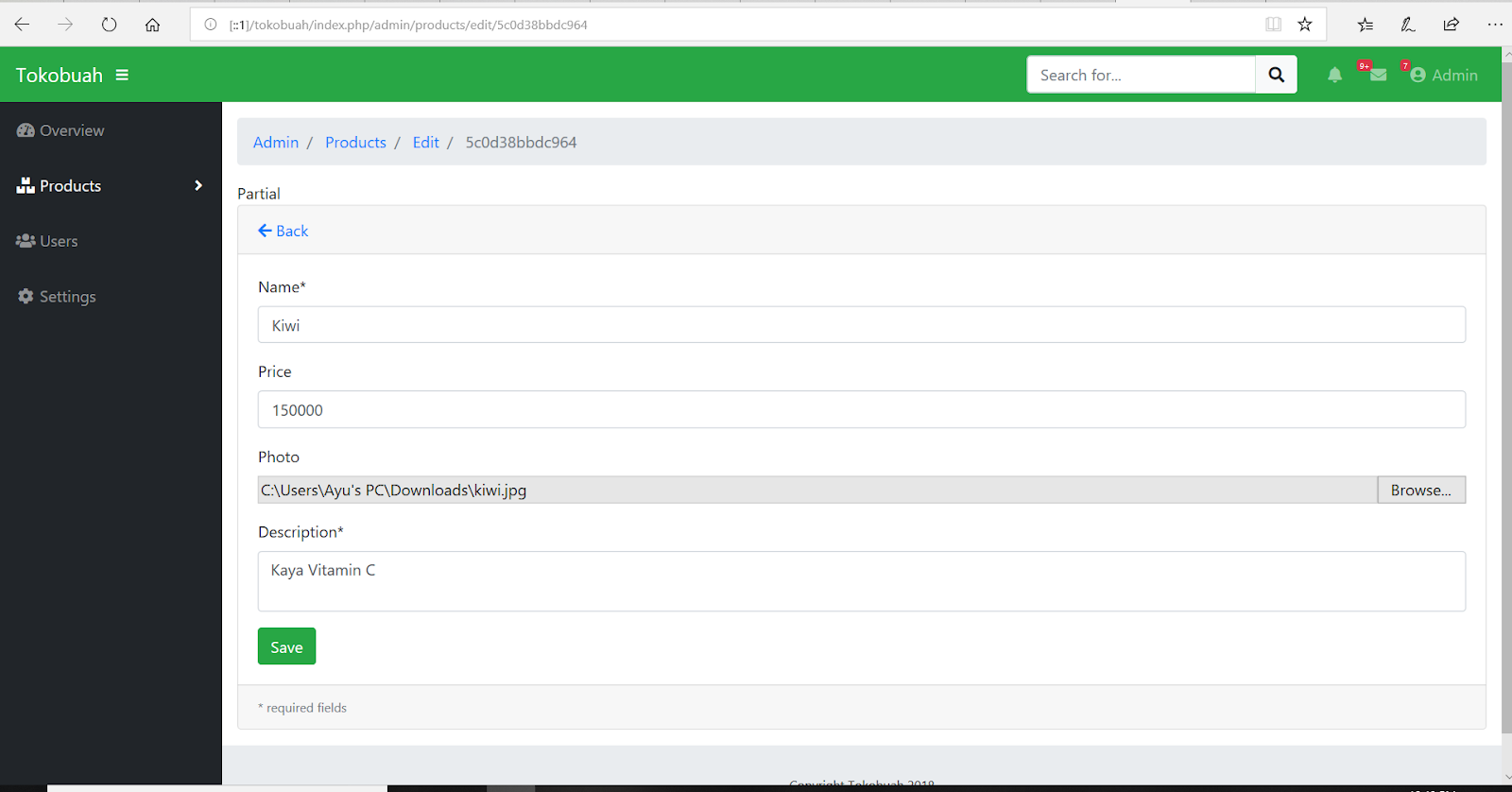
 Partial   

-footer.php

 <!-- Sticky Footer -->  
 <footer class="sticky-footer">  
  <div class="container my-auto">  
   <div class="copyright text-center my-auto">  
    <span>Copyright <?php echo SITE_NAME ." ". Date('Y') ?></span>  
   </div>  
  </div>  
 </footer>  

-scrollup.php
 <!-- Scroll to Top Button-->  
 <a class="scroll-to-top rounded" href="#page-top">  
      <i class="fas fa-angle-up"></i>  
 </a>  


-modal,php
 <!-- Logout Modal-->  
 <div class="modal fade" id="logoutModal" tabindex="-1" role="dialog" aria-labelledby="exampleModalLabel" aria-hidden="true">  
  <div class="modal-dialog" role="document">  
   <div class="modal-content">  
    <div class="modal-header">  
     <h5 class="modal-title" id="exampleModalLabel">Ready to Leave?</h5>  
     <button class="close" type="button" data-dismiss="modal" aria-label="Close">  
      <span aria-hidden="true">×</span>  
     </button>  
    </div>  
    <div class="modal-body">Select "Logout" below if you are ready to end your current session.</div>  
    <div class="modal-footer">  
     <button class="btn btn-secondary" type="button" data-dismiss="modal">Cancel</button>  
     <a class="btn btn-primary" href="login.html">Logout</a>  
    </div>  
   </div>  
  </div>  
 </div>  
 <!-- Logout Delete Confirmation-->  
 <div class="modal fade" id="deleteModal" tabindex="-1" role="dialog" aria-labelledby="exampleModalLabel" aria-hidden="true">  
  <div class="modal-dialog" role="document">  
   <div class="modal-content">  
    <div class="modal-header">  
     <h5 class="modal-title" id="exampleModalLabel">Are you sure?</h5>  
     <button class="close" type="button" data-dismiss="modal" aria-label="Close">  
      <span aria-hidden="true">×</span>  
     </button>  
    </div>  
    <div class="modal-body">Data yang dihapus tidak akan bisa dikembalikan.</div>  
    <div class="modal-footer">  
     <button class="btn btn-secondary" type="button" data-dismiss="modal">Cancel</button>  
     <a id="btn-delete" class="btn btn-danger" href="#">Delete</a>  
    </div>  
   </div>  
  </div>  
 </div>  


-js.php

 <!-- Bootstrap core JavaScript-->  
 <script src="<?php echo base_url('assets/jquery/jquery.min.js') ?>"></script>  
 <script src="<?php echo base_url('assets/bootstrap/js/bootstrap.bundle.min.js') ?>"></script>  
 <!-- Core plugin JavaScript-->  
 <script src="<?php echo base_url('assets/jquery-easing/jquery.easing.min.js') ?>"></script>  
 <!-- Page level plugin JavaScript-->  
 <script src="<?php echo base_url('assets/chart.js/Chart.min.js') ?>"></script>  
 <script src="<?php echo base_url('assets/datatables/jquery.dataTables.js') ?>"></script>  
 <script src="<?php echo base_url('assets/datatables/dataTables.bootstrap4.js') ?>"></script>  
 <!-- Custom scripts for all pages-->  
 <script src="<?php echo base_url('js/sb-admin.min.js') ?>"></script>  
 <!-- Demo scripts for this page-->  
 <script src="<?php echo base_url('js/demo/datatables-demo.js') ?>"></script>  
 <script src="<?php echo base_url('js/demo/chart-area-demo.js') ?>"></script>  


-overview.php

 <!DOCTYPE html>  
 <html lang="en">  
 <head>  
      <?php $this->load->view("admin/_partials/head.php") ?>  
 </head>  
 <body id="page-top">  
 <?php $this->load->view("admin/_partials/navbar.php") ?>  
 <div id="wrapper">  
      <?php $this->load->view("admin/_partials/sidebar.php") ?>  
      <div id="content-wrapper">  
           <div class="container-fluid">  
     <!--   
     karena ini halaman overview (home), kita matikan partial breadcrumb.  
     Jika anda ingin mengampilkan breadcrumb di halaman overview,  
     silahkan hilangkan komentar (//) di tag PHP di bawah.  
     -->  
           <?php //$this->load->view("admin/_partials/breadcrumb.php") ?>  
           <!-- Icon Cards-->  
           <div class="row">  
                <div class="col-xl-3 col-sm-6 mb-3">  
                <div class="card text-white bg-primary o-hidden h-100">  
                     <div class="card-body">  
                     <div class="card-body-icon">  
                          <i class="fas fa-fw fa-comments"></i>  
                     </div>  
                     <div class="mr-5">26 New Messages!</div>  
                     </div>  
                     <a class="card-footer text-white clearfix small z-1" href="#">  
                     <span class="float-left">View Details</span>  
                     <span class="float-right">  
                          <i class="fas fa-angle-right"></i>  
                     </span>  
                     </a>  
                </div>  
                </div>  
                <div class="col-xl-3 col-sm-6 mb-3">  
                <div class="card text-white bg-warning o-hidden h-100">  
                     <div class="card-body">  
                     <div class="card-body-icon">  
                          <i class="fas fa-fw fa-list"></i>  
                     </div>  
                     <div class="mr-5">11 New Tasks!</div>  
                     </div>  
                     <a class="card-footer text-white clearfix small z-1" href="#">  
                     <span class="float-left">View Details</span>  
                     <span class="float-right">  
                          <i class="fas fa-angle-right"></i>  
                     </span>  
                     </a>  
                </div>  
                </div>  
                <div class="col-xl-3 col-sm-6 mb-3">  
                <div class="card text-white bg-success o-hidden h-100">  
                     <div class="card-body">  
                     <div class="card-body-icon">  
                          <i class="fas fa-fw fa-shopping-cart"></i>  
                     </div>  
                     <div class="mr-5">123 New Orders!</div>  
                     </div>  
                     <a class="card-footer text-white clearfix small z-1" href="#">  
                     <span class="float-left">View Details</span>  
                     <span class="float-right">  
                          <i class="fas fa-angle-right"></i>  
                     </span>  
                     </a>  
                </div>  
                </div>  
                <div class="col-xl-3 col-sm-6 mb-3">  
                <div class="card text-white bg-danger o-hidden h-100">  
                     <div class="card-body">  
                     <div class="card-body-icon">  
                          <i class="fas fa-fw fa-life-ring"></i>  
                     </div>  
                     <div class="mr-5">13 New Tickets!</div>  
                     </div>  
                     <a class="card-footer text-white clearfix small z-1" href="#">  
                     <span class="float-left">View Details</span>  
                     <span class="float-right">  
                          <i class="fas fa-angle-right"></i>  
                     </span>  
                     </a>  
                </div>  
                </div>  
           </div>  
           <!-- Area Chart Example-->  
           <div class="card mb-3">  
                <div class="card-header">  
                <i class="fas fa-chart-area"></i>  
                Visitor Stats</div>  
                <div class="card-body">  
                <canvas id="myAreaChart" width="100%" height="30"></canvas>  
                </div>  
                <div class="card-footer small text-muted">Updated yesterday at 11:59 PM</div>  
           </div>  
           </div>  
           <!-- /.container-fluid -->  
           <!-- Sticky Footer -->  
           <?php $this->load->view("admin/_partials/footer.php") ?>  
      </div>  
      <!-- /.content-wrapper -->  
 </div>  
 <!-- /#wrapper -->  
 <?php $this->load->view("admin/_partials/scrolltop.php") ?>  
 <?php $this->load->view("admin/_partials/modal.php") ?>  
 <?php $this->load->view("admin/_partials/js.php") ?>  
 </body>  
 </html>  

/application/controllers/admin/products.php

 <?php  
 defined('BASEPATH') OR exit('No direct script access allowed');  
 class Products extends CI_Controller  
 {  
   public function __construct()  
   {  
     parent::__construct();  
     $this->load->model("product_model");  
     $this->load->library('form_validation');  
   }  
   public function index()  
   {  
     $data["products"] = $this->product_model->getAll();  
     $this->load->view("admin/product/list", $data);  
   }  
   public function add()  
   {  
     $product = $this->product_model;  
     $validation = $this->form_validation;  
     $validation->set_rules($product->rules());  
     if ($validation->run()) {  
       $product->save();  
       $this->session->set_flashdata('success', 'Berhasil disimpan');  
     }  
     $this->load->view("admin/product/new_form");  
   }  
   public function edit($id = null)  
   {  
     if (!isset($id)) redirect('admin/products');  
     $product = $this->product_model;  
     $validation = $this->form_validation;  
     $validation->set_rules($product->rules());  
     if ($validation->run()) {  
       $product->update();  
       $this->session->set_flashdata('success', 'Berhasil disimpan');  
     }  
     $data["product"] = $product->getById($id);  
     if (!$data["product"]) show_404();  
     $this->load->view("admin/product/edit_form", $data);  
   }  
   public function delete($id=null)  
   {  
     if (!isset($id)) show_404();  
     if ($this->product_model->delete($id)) {  
       redirect(site_url('admin/products'));  
     }  
   }  
 }  


views/admin/product/list.php

 <!DOCTYPE html>  
 <html lang="en">  
 <head>  
      <?php $this->load->view("admin/_partials/head.php") ?>  
 </head>  
 <body id="page-top">  
      <?php $this->load->view("admin/_partials/navbar.php") ?>  
      <div id="wrapper">  
           <?php $this->load->view("admin/_partials/sidebar.php") ?>  
           <div id="content-wrapper">  
                <div class="container-fluid">  
                     <?php $this->load->view("admin/_partials/breadcrumb.php") ?>  
                     <!-- DataTables -->  
                     <div class="card mb-3">  
                          <div class="card-header">  
                               <a href="<?php echo site_url('admin/products/add') ?>"><i class="fas fa-plus"></i> Add New</a>  
                          </div>  
                          <div class="card-body">  
                               <div class="table-responsive">  
                                    <table class="table table-hover" id="dataTable" width="100%" cellspacing="0">  
                                         <thead>  
                                              <tr>  
                                                   <th>Name</th>  
                                                   <th>Price</th>  
                                                   <th>Photo</th>  
                                                   <th>Description</th>  
                                                   <th>Action</th>  
                                              </tr>  
                                         </thead>  
                                         <tbody>  
                                              <?php foreach ($products as $product): ?>  
                                              <tr>  
                                                   <td width="150">  
                                                        <?php echo $product->name ?>  
                                                   </td>  
                                                   <td>  
                                                        <?php echo $product->price ?>  
                                                   </td>  
                                                   <td>  
                                                        <img src="<?php echo base_url('upload/product/'.$product->image) ?>" width="64" />  
                                                   </td>  
                                                   <td class="small">  
                                                        <?php echo substr($product->description, 0, 120) ?>...</td>  
                                                   <td width="250">  
                                                        <a href="<?php echo site_url('admin/products/edit/'.$product->product_id) ?>"  
                                                         class="btn btn-small"><i class="fas fa-edit"></i> Edit</a>  
                                                        <a onclick="deleteConfirm('<?php echo site_url('admin/products/delete/'.$product->product_id) ?>')"  
                                                         href="#!" class="btn btn-small text-danger"><i class="fas fa-trash"></i> Hapus</a>  
                                                   </td>  
                                              </tr>  
                                              <?php endforeach; ?>  
                                         </tbody>  
                                    </table>  
                               </div>  
                          </div>  
                     </div>  
                </div>  
                <!-- /.container-fluid -->  
                <!-- Sticky Footer -->  
                <?php $this->load->view("admin/_partials/footer.php") ?>  
           </div>  
           <!-- /.content-wrapper -->  
      </div>  
      <!-- /#wrapper -->  
      <?php $this->load->view("admin/_partials/scrolltop.php") ?>  
      <?php $this->load->view("admin/_partials/modal.php") ?>  
      <?php $this->load->view("admin/_partials/js.php") ?>  
 </body>  
 </html>  

views/admin/product/new_form.php

 <!DOCTYPE html>  
 <html lang="en">  
 <head>  
      <?php $this->load->view("admin/_partials/head.php") ?>  
 </head>  
 <body id="page-top">  
      <?php $this->load->view("admin/_partials/navbar.php") ?>  
      <div id="wrapper">  
           <?php $this->load->view("admin/_partials/sidebar.php") ?>  
           <div id="content-wrapper">  
                <div class="container-fluid">  
                     <?php $this->load->view("admin/_partials/breadcrumb.php") ?>  
                     <?php if ($this->session->flashdata('success')): ?>  
                     <div class="alert alert-success" role="alert">  
                          <?php echo $this->session->flashdata('success'); ?>  
                     </div>  
                     <?php endif; ?>  
                     <div class="card mb-3">  
                          <div class="card-header">  
                               <a href="<?php echo site_url('admin/products/') ?>"><i class="fas fa-arrow-left"></i> Back</a>  
                          </div>  
                          <div class="card-body">  
                               <form action="<?php base_url('admin/product/add') ?>" method="post" enctype="multipart/form-data" >  
                                    <div class="form-group">  
                                         <label for="name">Name*</label>  
                                         <input class="form-control <?php echo form_error('name') ? 'is-invalid':'' ?>"  
                                          type="text" name="name" placeholder="Product name" />  
                                         <div class="invalid-feedback">  
                                              <?php echo form_error('name') ?>  
                                         </div>  
                                    </div>  
                                    <div class="form-group">  
                                         <label for="price">Price*</label>  
                                         <input class="form-control <?php echo form_error('price') ? 'is-invalid':'' ?>"  
                                          type="number" name="price" min="0" placeholder="Product price" />  
                                         <div class="invalid-feedback">  
                                              <?php echo form_error('price') ?>  
                                         </div>  
                                    </div>  
                                    <div class="form-group">  
                                         <label for="name">Photo</label>  
                                         <input class="form-control-file <?php echo form_error('price') ? 'is-invalid':'' ?>"  
                                          type="file" name="image" />  
                                         <div class="invalid-feedback">  
                                              <?php echo form_error('image') ?>  
                                         </div>  
                                    </div>  
                                    <div class="form-group">  
                                         <label for="name">Description*</label>  
                                         <textarea class="form-control <?php echo form_error('description') ? 'is-invalid':'' ?>"  
                                          name="description" placeholder="Product description..."></textarea>  
                                         <div class="invalid-feedback">  
                                              <?php echo form_error('description') ?>  
                                         </div>  
                                    </div>  
                                    <input class="btn btn-success" type="submit" name="btn" value="Save" />  
                               </form>  
                          </div>  
                          <div class="card-footer small text-muted">  
                               * required fields  
                          </div>  
                     </div>  
                     <!-- /.container-fluid -->  
                     <!-- Sticky Footer -->  
                     <?php $this->load->view("admin/_partials/footer.php") ?>  
                </div>  
                <!-- /.content-wrapper -->  
           </div>  
           <!-- /#wrapper -->  
           <?php $this->load->view("admin/_partials/scrolltop.php") ?>  
           <?php $this->load->view("admin/_partials/js.php") ?>  
 </body>  
 </html>  


views/admin/product/edit.form.php

 <!DOCTYPE html>  
 <html lang="en">  
 <head>  
      <?php $this->load->view("admin/_partials/head.php") ?>  
 </head>  
 <body id="page-top">  
      <?php $this->load->view("admin/_partials/navbar.php") ?>  
      <div id="wrapper">  
           <?php $this->load->view("admin/_partials/sidebar.php") ?>  
           <div id="content-wrapper">  
                <div class="container-fluid">  
                     <?php $this->load->view("admin/_partials/breadcrumb.php") ?>  
                     <?php if ($this->session->flashdata('success')): ?>  
                     <div class="alert alert-success" role="alert">  
                          <?php echo $this->session->flashdata('success'); ?>  
                     </div>  
                     <?php endif; ?>  
                     <!-- Card -->  
                     <div class="card mb-3">  
                          <div class="card-header">  
                               <a href="<?php echo site_url('admin/products/') ?>"><i class="fas fa-arrow-left"></i>  
                                    Back</a>  
                          </div>  
                          <div class="card-body">  
                               <form action="<?php base_url('admin/product/edit') ?>" method="post" enctype="multipart/form-data">  
                                    <input type="hidden" name="id" value="<?php echo $product->product_id?>" />  
                                    <div class="form-group">  
                                         <label for="name">Name*</label>  
                                         <input class="form-control <?php echo form_error('name') ? 'is-invalid':'' ?>"  
                                          type="text" name="name" placeholder="Product name" value="<?php echo $product->name ?>" />  
                                         <div class="invalid-feedback">  
                                              <?php echo form_error('name') ?>  
                                         </div>  
                                    </div>  
                                    <div class="form-group">  
                                         <label for="price">Price</label>  
                                         <input class="form-control <?php echo form_error('price') ? 'is-invalid':'' ?>"  
                                          type="number" name="price" min="0" placeholder="Product price" value="<?php echo $product->price ?>" />  
                                         <div class="invalid-feedback">  
                                              <?php echo form_error('price') ?>  
                                         </div>  
                                    </div>  
                                    <div class="form-group">  
                                         <label for="name">Photo</label>  
                                         <input class="form-control-file <?php echo form_error('image') ? 'is-invalid':'' ?>"  
                                          type="file" name="image" />  
                                         <input type="hidden" name="old_image" value="<?php echo $product->image ?>" />  
                                         <div class="invalid-feedback">  
                                              <?php echo form_error('image') ?>  
                                         </div>  
                                    </div>  
                                    <div class="form-group">  
                                         <label for="name">Description*</label>  
                                         <textarea class="form-control <?php echo form_error('description') ? 'is-invalid':'' ?>"  
                                          name="description" placeholder="Product description..."><?php echo $product->description ?></textarea>  
                                         <div class="invalid-feedback">  
                                              <?php echo form_error('description') ?>  
                                         </div>  
                                    </div>  
                                    <input class="btn btn-success" type="submit" name="btn" value="Save" />  
                               </form>  
                          </div>  
                          <div class="card-footer small text-muted">  
                               * required fields  
                          </div>  
                     </div>  
                     <!-- /.container-fluid -->  
                     <!-- Sticky Footer -->  
                     <?php $this->load->view("admin/_partials/footer.php") ?>  
                </div>  
                <!-- /.content-wrapper -->  
           </div>  
           <!-- /#wrapper -->  
           <?php $this->load->view("admin/_partials/scrolltop.php") ?>  
           <?php $this->load->view("admin/_partials/js.php") ?>  
 </body>  
 </html>